
AC Outdoor Fan Not Spinning: Stop and Record the Signs
On this page
- Quick answer
- Confirm whether cooling is being requested
- Observe the outdoor unit from a safe distance
- When to turn the system off
- Possible causes a technician may evaluate
- Why not to push or reach for the fan
- Handle breaker information carefully
- Check indoor signs without opening equipment
- Prepare useful service notes
- Protect people and the home while waiting
- Frequently asked questions
- Conclusion and next steps
Quick answer
If the thermostat is actively requesting cooling and the outdoor unit hums, buzzes, smells hot, or has a compressor-like sound while its top or side fan remains still, turn cooling off and call an HVAC technician. Do not push the blade, reach through the grille, open a panel, or keep resetting a breaker. Record thermostat settings, sounds, odors, ice, and timing from a safe distance for the service call.
An outdoor fan can be stopped normally when the system is not running or during some system-specific operating modes. Confirm the cooling request before treating a stationary fan as a fault, and use the equipment’s own documentation.

Confirm whether cooling is being requested
Check the thermostat display and mode. Cooling should be selected, the setpoint should be below the current indoor temperature, and an active cooling indicator may appear. Some thermostats include a built-in delay after a setting change or power interruption.
Wait only for the normal delay described by the thermostat or HVAC manufacturer. Do not repeatedly lower the setpoint or switch modes to force a start. If the display is blank, reports an error, or loses power, note it for the technician.
Observe the outdoor unit from a safe distance
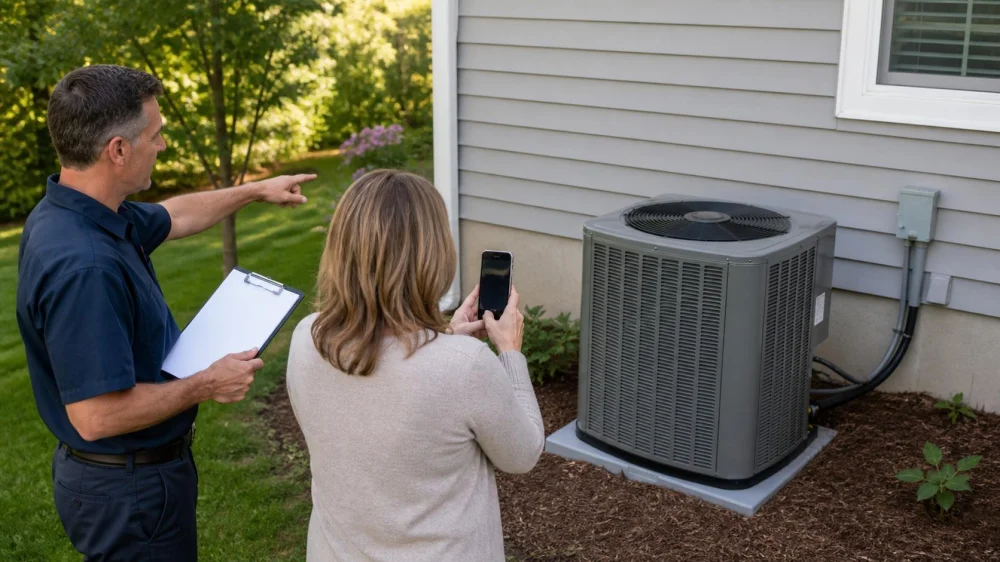
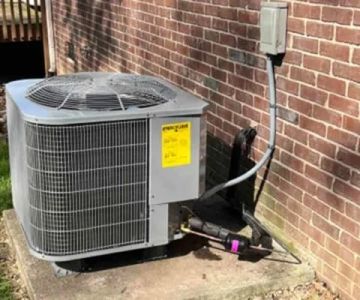
Stand on dry ground outside the service clearance area. Without touching the cabinet, note:
- whether the fan blade is completely still or starts and stops;
- humming, buzzing, clicking, grinding, or compressor-like sound;
- burning or hot electrical odor;
- visible ice on refrigerant lines or the coil;
- steam during a heat-pump defrost cycle;
- debris resting on the grille;
- recent power outage, storm, yard work, or service.
Use a short video from outside the clearance zone if it can be recorded safely.
When to turn the system off
Turn cooling off at the thermostat when the outdoor unit appears energized but the fan does not run, especially with humming, buzzing, heat, odor, repeated clicking, or poor cooling. Continued operation can add stress or heat to components.
For smoke, sparks, flame, melting material, or a strong burning odor, keep away, evacuate as appropriate, and call emergency services. Do not approach the disconnect or electrical panel through water, smoke, or an unsafe area.
Possible causes a technician may evaluate
A trained technician may investigate the fan motor, capacitor, contactor, controls, wiring, power supply, pressure or temperature protection, refrigerant circuit, blocked coil, incorrect command, or system-specific operating logic. More than one condition can produce the same visible symptom.
Do not choose a replacement part from an online symptom list. Electrical ratings, wiring, stored energy, motor design, refrigerant condition, and manufacturer procedures must be verified on the actual equipment.
Why not to push or reach for the fan
A fan can start without warning. The grille, blade, and cabinet may have sharp edges, and moving parts can cause serious injury. A stick or tool can break a blade, damage the motor, or become a projectile.
Capacitors and electrical components can retain hazardous energy even when the system appears off. Never remove the service panel, disconnect cover, or fan grille unless you are qualified and following the correct lockout and service procedure.
Handle breaker information carefully
Check from a normal viewing position whether the labeled HVAC breaker appears tripped only if the electrical panel area is dry, intact, and safe. A breaker that trips again indicates a fault that needs professional diagnosis.
Do not repeatedly reset it, hold it in position, install a larger breaker, replace a fuse, or open the outdoor disconnect. Tell the technician about any trip, outage, surge, or electrical work.
Check indoor signs without opening equipment
Note whether air comes from supply vents, whether it feels cool, whether the indoor fan runs continuously, and whether water or ice is visible around accessible portions of the indoor unit and refrigerant line. A dirty or collapsed accessible filter may reduce airflow.
Do not open the air handler, chip ice, use a heat gun, pour hot water, or run cooling with a frozen coil. Turn cooling off and follow technician guidance; the indoor fan setting may be used only if the system instructions or technician recommends it.
Prepare useful service notes
- thermostat mode, setpoint, room temperature, and error message;
- time the issue began and outside weather conditions;
- whether the outdoor fan, indoor fan, or both stopped;
- sounds, odors, ice, water, and breaker history;
- filter size, condition, and most recent replacement date;
- model and serial information from an accessible label, without removing panels;
- recent maintenance, repairs, outages, or landscaping changes.
Ask whether the system should remain fully off until the visit and how to protect temperature-sensitive occupants.
Protect people and the home while waiting
Close blinds on sunny windows, limit heat-producing appliances, use safe portable fans, and move to a cooler area. Hydrate and monitor children, older adults, pregnant people, pets, and anyone with a medical condition that affects heat tolerance.
If indoor heat becomes unsafe, use an air-conditioned public place, trusted home, or suitable temporary accommodation. Seek medical help for signs of heat illness. Do not use an unvented combustion appliance or improvised electrical setup for cooling.
Frequently asked questions
Can the compressor run if the outdoor fan does not?
It may appear or sound active, but only a technician should confirm component operation. Turn cooling off rather than letting the condition continue.
Should I spin the blade with a stick?
No. The fan can start unexpectedly, and the blade, tool, motor, or grille can be damaged or cause injury.
Could a thermostat delay make the fan look broken?
Yes. Many systems delay restarting. Follow the documented delay and observe whether the thermostat is actually requesting cooling.
Can leaves on top stop the fan?
Loose debris can interfere, but do not reach through the grille or approach a unit that may start. Turn the system off and ask how to remove it safely.
Conclusion and next steps
Verify that cooling is being requested, then observe the outdoor unit from dry ground outside its clearance area. If the unit sounds energized while the fan is still, turn cooling off and schedule HVAC service. Keep hands and tools away, avoid panel and breaker work, document the signs, and make a safe heat plan for occupants while the equipment remains off.
 Roger Stuth Air Conditioning4.0 (48 reviews)
 Modern HVAC4.0 (19 reviews)
 Air Maxx Cool Ac Repair4.0 (14 reviews)
 Lollar Mechanical Services LLC Heating and AC Repair5.0 (20 reviews)
 Kurt's AC & Heat4.0 (352 reviews)
 Salt Removers Corporation. Heating & Air Service Div.0.0 (0 reviews)
 Complete Guide: Air Conditioning Replace for Homeowners in 2025 | Ac Fix
 Top Ways to Get Your AC Fixed Quickly and Affordably in Your Area
 How to Identify a Faulty AC Condenser Coil and Replace It
 Why Your Air Conditioner is Leaking Freon and How to Fix It
 How to Troubleshoot Your Air Conditioner’s Refrigerant Issues
 How to Identify and Replace a Faulty Air Conditioner Fan Motor Safely