
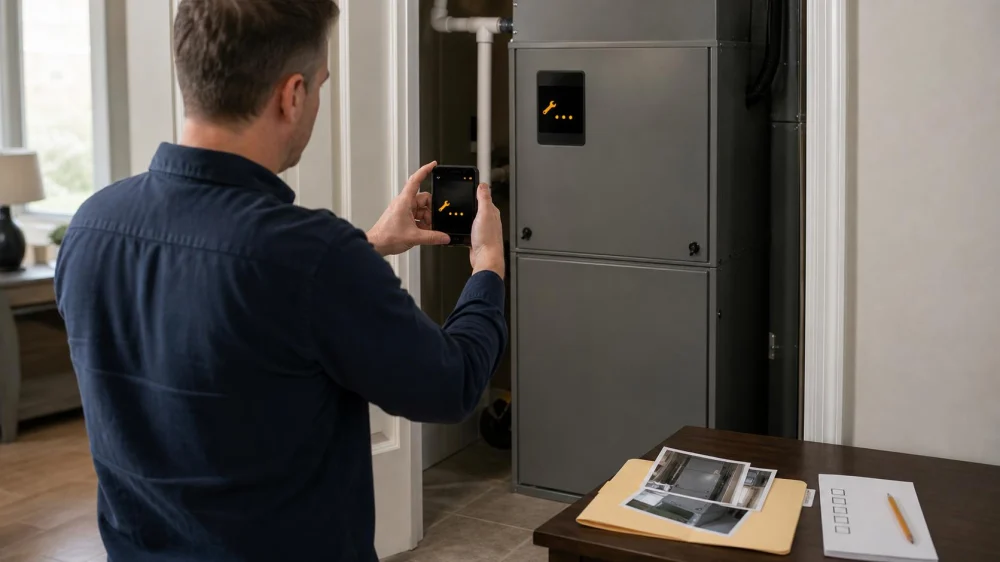
AC Error Code: Photograph It Before You Reset Anything
An AC error code is a clue generated by a particular control, not a universal diagnosis. The same letters or flashes can mean different things across brands and models. Before changing settings or cutting power, capture the exact display, identify which device produced it, record what the system was doing, and use the correct official manual or qualified technician.
Quick answer
Photograph the code and full control screen before pressing anything. Note the date, time, thermostat settings, indoor conditions, sounds, odors, water, ice, and whether the indoor and outdoor units run. Find the model number from safe accessible documentation and use that exact official manual. Do not repeatedly reset power, open equipment panels, or assume an internet list matches your system. Call service promptly for electrical, overheating, refrigerant, water, or repeated-lockout signs.

Identify the source of the code
The message may appear on a wall thermostat, indoor air-handler control, furnace board, outdoor condenser, mini-split head, condensate pump, zoning panel, smart-home app, or accessory such as a dehumidifier. Record the device and location.
A thermostat may report a communication problem rather than a failed compressor. An app may paraphrase a code while the equipment stores a more specific fault. Flash patterns can include long and short pulses, pauses, colours, or repeating groups.
Do not remove a panel just to view an internal light. Door switches, high voltage, sharp metal, moving blowers, hot components, and stored electrical energy can be present. Let the technician access internal diagnostics.
Foulks Southern Air Heating and Cooling
HammondTangipahoa ParishLouisiana
43233 S Airport Rd #100, Hammond, LA 70403, USA
Capture the complete evidence
Take a clear photo and a short video if the display scrolls or flashes. Include the surrounding control so the source is obvious. Then record:
- the exact characters, punctuation, colour, and flash sequence;
- whether the code is current, intermittent, or in a history menu;
- thermostat mode, setpoint, fan setting, schedule, and hold;
- indoor temperature and humidity;
- indoor airflow and outdoor-unit operation;
- new sounds, smells, vibration, water, or ice;
- recent outage, filter change, maintenance, construction, or thermostat update;
- what happened immediately before the message appeared.
Keep the original file timestamp. A code that clears on its own can still help when paired with a reliable timeline.
Match the exact model and manual
Use the owner packet, invoice, service record, equipment registration, or a safely accessible exterior label photo to identify manufacturer, model, and control version. A family name alone may include several incompatible boards or thermostat generations.
Download the manual from the manufacturer’s official site or use the copy supplied with the system. Match the complete model identifier and document revision. Separate homeowner actions from installer or service procedures. A code table in a different model’s manual can send troubleshooting in the wrong direction.
Codes often identify a detected condition—such as communication loss, sensor range, pressure protection, drainage interlock, or ignition lockout—not the failed part. Several root causes can trigger one protection.
Decide whether a reset is appropriate
Some owner manuals specify a single safe reset or a wait period after an outage. Follow that exact sequence only when no emergency warning sign is present. Photograph the code first and note whether it returns and how long that takes.
Do not repeatedly cycle a breaker, service disconnect, or thermostat to force operation. Repeated restarts can erase useful history, stress equipment, defeat a protective lockout, or energize a system with an unresolved fault. A breaker that trips again requires service rather than another reset.
If the manual does not authorize an owner reset, leave the equipment in the safest documented state and call. Do not use a factory-reset menu casually; it can erase commissioning, zoning, accessory, or network settings.
Make only safe external checks
- Confirm the thermostat mode and setpoint are intentional.
- Check that the filter is the correct size, seated properly, and not visibly overloaded.
- Make sure accessible supply and return grilles are not blocked.
- Check the condensate area from a dry position for visible overflow, without opening equipment.
- Observe the outdoor unit from the ground for debris clearance, ice, unusual sound, or no operation.
- Review whether a utility demand-response event or smart schedule is active.
Stop immediately for smoke, sparks, burning or hot-plastic odor, severe grinding, exposed wiring, repeated breaker trips, water near electricity, or a visibly damaged refrigerant line.
Prepare for the service call
Send the company the code photo, equipment model, system age if known, address, symptom timeline, and any safety concern. Ask whether the system should remain off and which indoor and outdoor units need access.
At the visit, request a diagnosis that connects the code to measurements and observed causes. A proposed part should not be justified only by the code name. Ask whether the fault is active or stored, what tests confirmed it, what other causes were ruled out, and whether warranty coverage applies.
After repair, keep the invoice, diagnostic readings, part number, code history, and technician notes. Record whether the code cleared and how operation was verified.
Safety and interpretation limits
This article does not decode any specific equipment. HVAC systems contain high voltage, capacitors, moving parts, hot surfaces, combustion hazards, pressurized refrigerant, and water near electricity. Refrigerant, electrical, gas, and internal control work may require qualified or licensed professionals.
Call emergency services for fire, suspected carbon monoxide, serious electrical incident, or medical symptoms. Leave the area for smoke, strong burning odour, gas odour, or another immediate hazard and follow local emergency instructions.
Frequently asked questions
Can I search the code online?
Use an exact official manual for the model and control version. General search results can mix brands, model years, and installer-only procedures.
What if the code disappeared?
Keep the photo and timeline. Some systems retain fault history that a technician can retrieve even after normal operation returns.
Does the code tell me which part to buy?
Usually not by itself. It identifies a detected condition, and proper diagnosis must test possible causes.
Should I factory-reset a smart thermostat?
Not unless the correct manual or qualified support directs it. A factory reset can erase equipment configuration and diagnostic context.
Next steps
Capture the full display, identify the source device and exact model from safe records, and write a short symptom timeline. Read only the matching official owner guidance. If one authorized reset does not resolve the issue—or any warning sign appears—stop experimenting and give the evidence to qualified HVAC service.
 AC PRO HEATING AND COOLING, LLC5.0 (2 reviews)
 Comfort Creators5.0 (4 reviews)
 Rogers Mechanical5.0 (217 reviews)
 BELLMECH4.0 (35 reviews)
 Precise Air4.0 (15 reviews)
 Future Aire Heating and Air Conditioning of Wildwood5.0 (2 reviews)
 The Importance of Regular Air Conditioner Servicing and How to Schedule It
 The Ultimate Checklist to Find Who Can Fix My Air Conditioner Successfully
 How to Fix an Air Conditioner that Is Not Blowing Air at All
 Experts Explain How to Fix AC Unit Like a Pro
 Affordable Companies That Fix Central Air Conditioning Units Near You
 Avoid These Common Mistakes When Trying to Fix an Air Conditioning Leak